
DaVinci Resolve plugin
Real Screen for DaVinci Resolve
Turn any shot into a filmed screen: real pixels, a camera moving over them, moire and reflections like a real shoot. Right inside DaVinci Resolve.
Secure payment · Refund within 14 days
≈ $28 · charged in your currency at checkout
Try it free for 7 days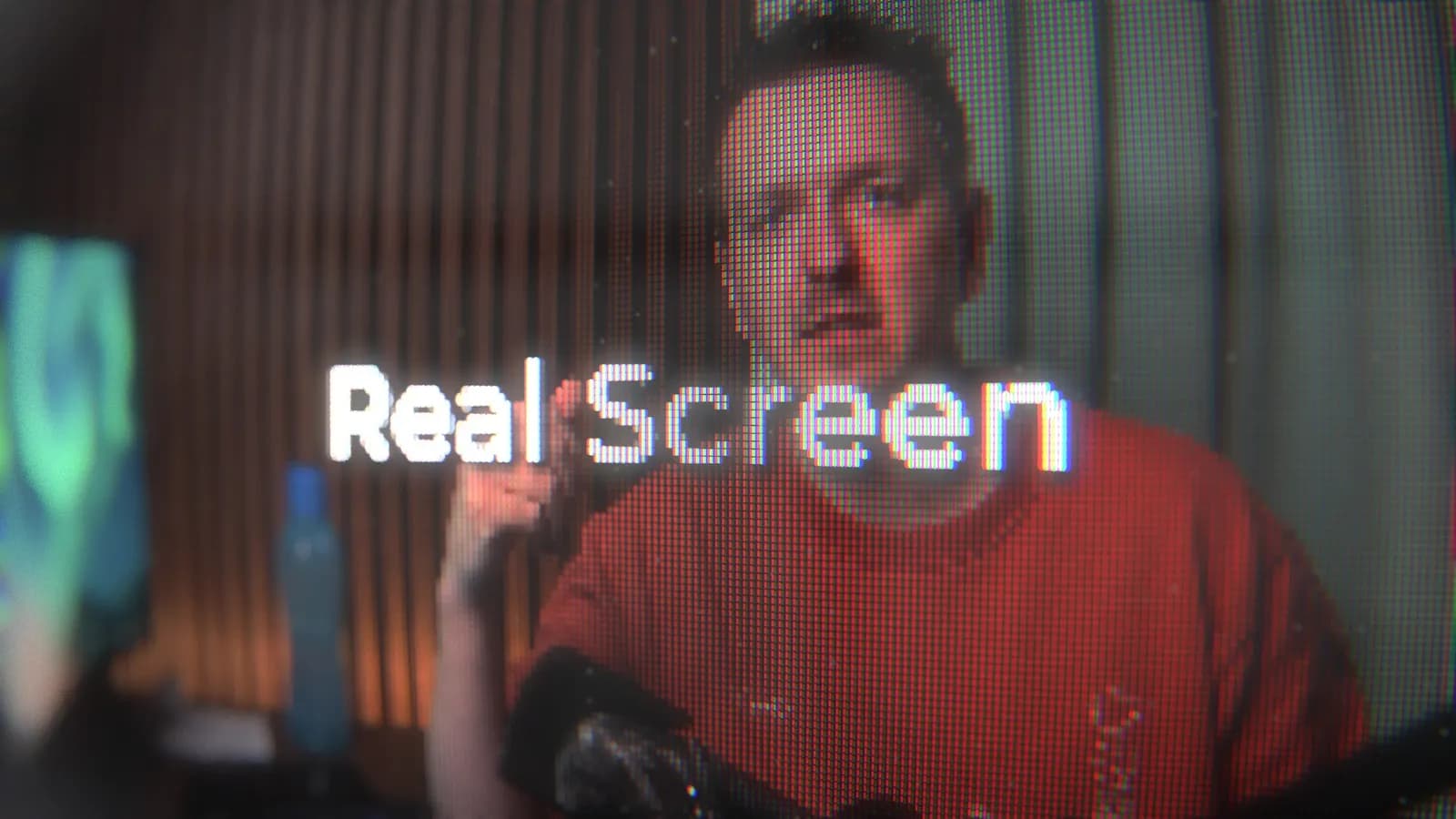

Try it free for 7 days. Made by Kriss Norde, Blackmagic Design certified trainer.
A fake screen gives itself away
To show a website, an app or a video "on a screen", most people put a pixel grid and a few lines over the picture. It stays flat: the grid doesn't move with the camera, nothing goes out of focus, no moire, no reflection. Viewers see a filter, and they can tell.
A camera filming real pixels
Real Screen rebuilds the screen pixel by pixel, with its red, green and blue subpixels, then films it with a virtual camera. Move the camera closer and the pixels grow. Pull focus and the screen goes from soft to sharp. Moire comes and goes, just like in front of a real monitor.
1. Drop the effect
Drag Real Screen, or one of its 12 presets, onto your clip on the Edit page.
2. Pick the screen
LCD, LED, OLED, plasma, honeycomb panel, CRT computer monitor, color CRT TV or scanline CRT TV.
3. Frame the start and the end
Set a start framing and an end framing: Real Screen moves the camera between them, over the whole clip or at a constant speed, with the easing curve you choose.
What you get out of it
A camera move in two framings
Aim, zoom, angles and focus, at the start and at the end. An optional waypoint gives a curved path. Buttons copy, swap or reset the framings.
Eight screens, from new to broken
One control ages the screen: new, misadjusted, broken. Dead pixels, rolling picture, snow, burn-in and phosphor trails on CRTs.
The details of a real shoot
Depth of field, autofocus hunting, handheld camera, dust, fingerprints, room reflections. You can even reflect your own photo or video in the screen.
Power on and power off
The screen turns on at the start of the clip and off at the end, each type in its own way: the line and the shrinking dot of a CRT, the flash of a flat screen.
Your video format
16:9, 4:3, square or vertical 9:16 for Reels and Shorts. The screen bezel in black plastic, beige plastic from an old PC, or aluminum.
12 presets to start with
Drop one on your clip, then adjust the screen type and the framings.

Monitor - reading text 
Monitor - vertical tracking 
Monitor - orbit 
Monitor - static close-up 
2000s PC screen 
90s CRT monitor 
Misadjusted CRT TV 
Broken TV 
Giant LED - low angle 
Honeycomb panel 
Smartphone close-up 
Plasma TV
Simple controls
The settings fit in four steps in the Inspector: Screen, Framing, Movement, Finishing. Only the first one is open, and the controls that don't apply to the chosen screen stay hidden. A draft mode keeps playback smooth while you edit.
What you receive
The Real Screen effect for the Edit page and its 12 presets, in English and French, with an installation guide. Save your own settings as presets in one click. Updates are included.
Building a believable screen by hand in Fusion takes hours of nodes for a single shot. With Real Screen, it takes two framings.
Launch price: €25 instead of €35, for a limited time.
Try it free for 7 days.
What you need
DaVinci Resolve Studio 21.2 or later, on Windows or Mac. Real Screen doesn't work in the free version of DaVinci Resolve. One license activates on 2 computers. Installation: double-click the .drfx file, then copy one file into the DaVinci Resolve Fuses folder. The guide walks you through it, then you enter your key in the License tab.
Your next on-screen shot can look like it was really filmed.
Certified trainer
Blackmagic Design certified trainer - Kriss Norde
Certificate code 8569-242A-D684-44B1

FAQ
Frequently asked questions
Everything you need to know before getting Real Screen for DaVinci Resolve.
How is it different from a CRT effect or a pixel grid over the picture?
+
A grid stays stuck to the picture. Real Screen simulates the screen and the camera filming it: the pixels grow as the camera gets closer, go out of focus, create moire, and the screen picks up a reflection. That is what makes it read as a real screen.
What shows up on the screen?
+
Your clip: the effect goes on it on the Edit page. A screen recording, a website, an app, a video or a photo, anything you put on the timeline.
Does it work with the free version of DaVinci Resolve?
+
No. Real Screen needs DaVinci Resolve Studio 21.2 or later, on Windows or Mac. Use the 7-day free trial to check it on your computer before you buy.
I don't know Fusion. Is that a problem?
+
No. Real Screen goes on your clip on the Edit page and you adjust it in the Inspector, like any DaVinci Resolve effect.
Does it work in vertical for Reels and Shorts?
+
Yes. The screen format can be 16:9, 4:3, square or vertical 9:16.
Will it slow down my edit?
+
A draft mode keeps playback smooth while you edit. Measured in 4K on an RTX 5090: 124 frames rendered in 4.8 seconds at final quality.
Can I try it before I buy?
+
Yes, free for 7 days, on one computer. If you buy it afterwards, it's the same key: click Activate in the License tab, with nothing to reinstall. A purchased license activates on 2 computers.
Ready to get started?
Turn any shot into a filmed screen: real pixels, a camera moving over them, moire and reflections like a real shoot. Right inside DaVinci Resolve.
€25(≈ $28)
Refund within 14 days